Showing posts with label osirix. Show all posts

10/21/09

Gaming and Training


While visualizing CT and MRI scans as 3D colorized volumetric images is not a new thing (see OsiriX, Fovia, VolumeGraphics, Amira, Mimics, 3D Slicer and many others that I personally don't know about), it is becoming quite popular for training and surgical planning. However, BodyViz actually uses an X-Box controller to bring the 3D patient scan to the surgeon. Personally, I find the use of a video game controller to be highly intriguing. As my generation grows and becomes the doctors and surgeons of the future, I know that I would prefer them to look at my body first before preforming surgery. And coming from a gaming background, using a game controller to move through a data set makes a certain amount of sense. Whether it be on this technology or something similar, I find the possibilities growing, and very exciting.

Video Game Technology Helps Train Surgeons

From BodyViz:


BodyViz has extensive visualization features that enable users to quickly and effectively view and interact with their patient's data in a never-before-seen 3D manner that is changing the way medical professionals view their world. The user interface is operated by an Xbox 360 controller which allows anyone from surgeons to medical/anatomy students to simply “travel” under the skin, past the bones, through the arteries, blood vessels and organs and literally fly through patients’ bodies. The game controller lets physicians create "clipping” planes and insert virtual surgical tools that can be maneuvered around internal structures of the anatomy in all directions. Users can also choose what tissue densities to view and from a variety of colors to enhance the data. BodyViz is affordably priced, lightweight and simple to use on laptops or PCs.

10/7/09

Museum Update

Well, I am still beyond tickled to see work I've done in OsiriX being used by the Fine Arts Museums of San Francisco. Short explanation of how the images were made to follow.

So, because I feel like sharing, here are two of the flyers in which my images are used. (the flyers are the work of the design team at the Museum, I just provided content).

The Press Release flyer.


A promotional flyer, first page.


First of all, I must admit that I have upgraded the computer that these images were made on to 64 bit version of OsiriX. It is an 8 core Mac Pro, with at least 4 gigs of memory, perhaps more. I drool over it, but it's not mine. In any case, it handles large case files well- and this was a very large file. Multiple scan inputs, with the largest being over 4,000 slices. Needless to say, the 32-bit OsiriX, while open-source and awesome, could not handle this dataset.

So, by upgrading to the 64-bit version, we were able to utilize the full power of the machine. And let me tell you, for 3D visualization purposes, I highly recommend the upgrade. It's amazing and well worth the money. And doesn't it just give you a warm fuzzy feeling to know you are supporting a favorite program? Maybe that's just me... If the warm fuzzies don't do it for you, knowing that a 3000+ data set can be opened without hiccups and in less than 2 minutes may peak your interest. I am thoroughly enjoying the upgrade, when I get to use it.

Now that the program handles the dataset (barely), it takes hours of fine tuning to get any sort of recognizable image. I much prefer working with live humans, as the cadavers (especially mummies!) just don't have the same clarity. None of the pre-set CLUTs that come with OsiriX truly worked with this mummy data, but I had a very interesting time coming up with my own 16-bit CLUTs to use and save. The results were quite interesting, and for the most part, the museum didn't ask for any major changes. I did tweak the overall color in Photoshop (from a red to a golden-orange), but no cover-ups or major Photoshop changes.

I do love OsiriX and any opportunity to use it is great fun, not just work.

That is pretty much it. Now, I have to find someone I can vivisect to see the brachioplexus in action. Any volunteers?

10/2/09

Meet the new "Working Me"


Soooo... with the advent of my internship and then subsequent job at eHuman, I have been beyond busy. I don't think they've invented a word that actually covers how much work I'm doing. Which I am not allowed to post. There's this whole 'non-disclosure' agreement companies make you sign...

In any case, I can post things that have been released into the wild, so to speak. So, here are some images I generated in OsiriX for a mummy that was recently scanned at Stanford. Some are !gasp! actually being used in print. (which I am actually incredibly giddy about...)

The Fine Arts Museums of San Francisco are putting on the Very Postmortem: Mummies and Medicine exhibit.
"Archaeology meets technology in this small-scale exhibition exploring the scientific examination of mummies and providing new insights into the conditions under which the Egyptians lived. Included is the sarcophagus and mummy of Irethorrou, a priest from Egypt around 500 B.C. His mummy has undergone a CT-scan that allows a unique viewing experience of a three-dimensional “fly through” of the body and a forensic reconstruction of his head."
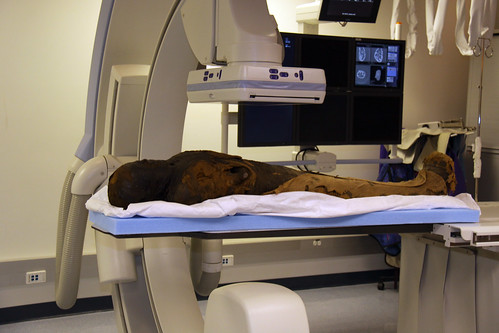
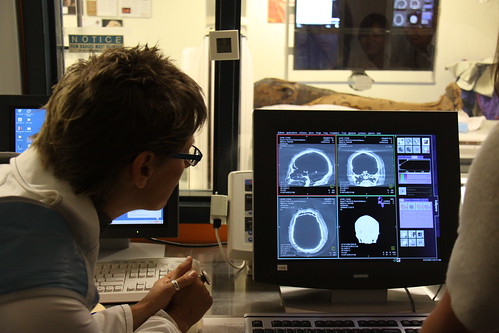
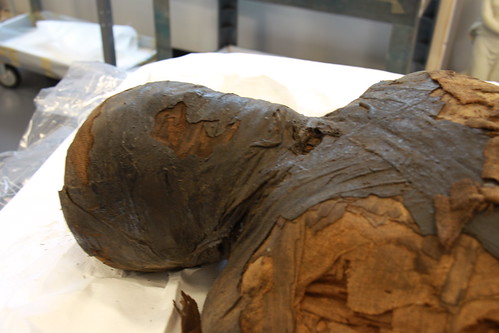
Here are some images from their flicker archive of the transport of the mummy.

Being scanned by a 'c-arm' scanner at the Stanford Hospital.


Checking out the incoming images.


Meeting Irethorrou close up. He was a priest in Egypt from about 500 B.C.


And now, to meet him internally as well.... Here is a sampling of the OsiriX images that I generated.

A full body request - although the arms were not attached to this version of the scan. Because of the size, the mummy was scanned in multiple parts and then stitched together by the wonderful Robert at the eHuman office.


This image (without the logo and turned completely vertical) was used in the promotional flyer for the exhibit.


This was another one specifically requested to show this amulet. It has been decided that it is the "Eye of Ra" and they wanted to showcase it. Unfortunately, OsiriX may not be the best program for that. No matter how much I tweaked, that was the highest level of detail that came through on the amulet in OrisiX. So I doubt they will be using this one.


I am very excited to see the exhibit all put together, and can't wait for the 31st! (Opening it on Halloween is cute, I swear).

I will also attempt to post more often. Hopefully some other projects will become 'public friendly' and I'll be posting about other projects that eHuman is producing. It's an exciting time to be here, and I am absolutely loving my new job. And the fact that I have a job. Now this whole 'must graduate' thing is another story...

2/19/09

OsiriX Tutorial

Okay, as I was finishing up an assignment in OsiriX, I discovered this nifty shading control. So, as I went through it, I decided that others needed to know about this. In my own little world, no one else knew about this, so I wrote a tutorial. So, here comes OsiriX tutorial the second.


OsiriX: The Shading Menu

This covers, as it states, the shading menu within OsiriX. It is a set of very 3D-esque controls that influence the ambient, diffuse, and specular settings of your data set. Basically, it allows you to give your renders just a little bit more polish.